Slow PC for no obvious reason
PC Health lists what’s dragging it down: memory below its rated speed, a monitor below its maximum refresh rate, a nearly full drive and programs that start with Windows.
KipiaSensePC optimizer for Windows 10 and 11, for gaming and work
A Windows app that shows what’s wrong, changes only what you approve and measures the before and after. Everything with undo.
NewMy PC, drawnWallpaper LiveTaskbarEverything that changed
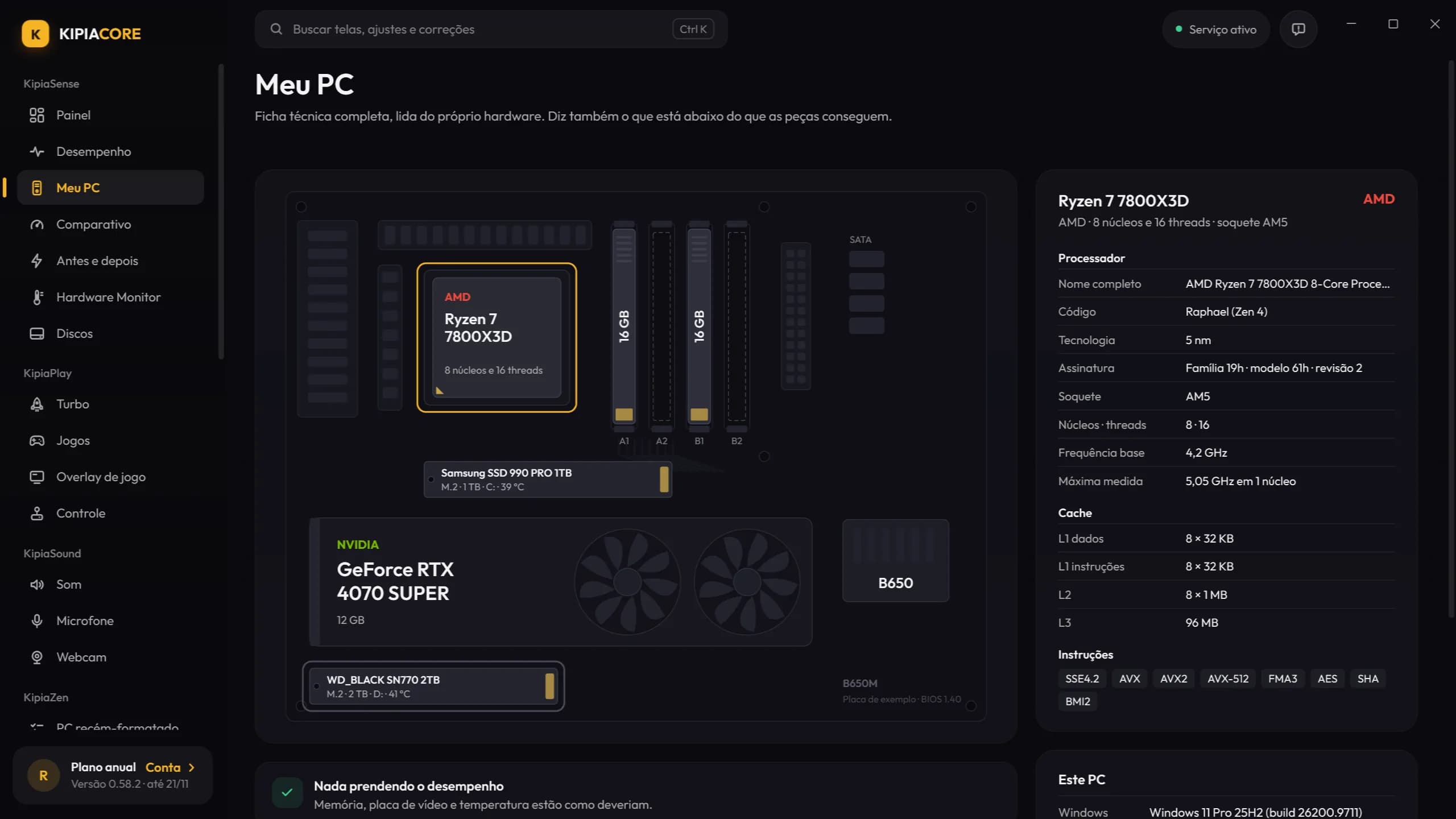
Checked just now, using what the hardware and Windows report.
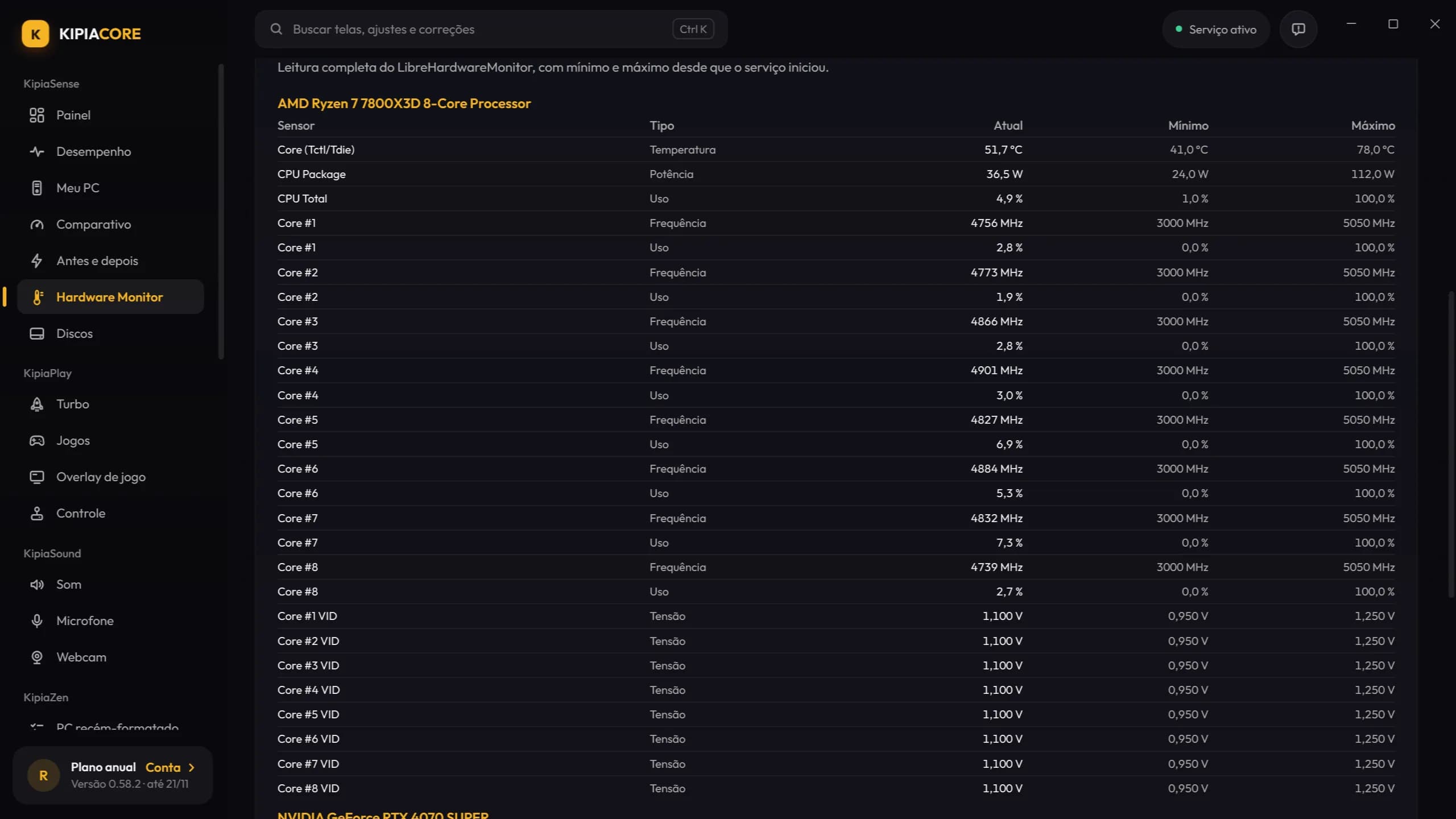
Processor and graphics card, last minute
Per PC. Cancel any time from your account area.
The first time, Optimize now gets your PC in shape and turns on Turbo. Before each game, Turbo closes the apps you pick, switches on maximum performance and gives the game priority. Everything goes back to how it was with one click.
You choose the steps and which apps it can close
When turned off: power plan, Game Mode, OneDrive and priority go back to how they were.
Six modules that work together: what the Dashboard finds, Fix repairs, Zen tunes and Tools measures.
Read from the hardware itself. When a part is performing below what it can, it tells you which one and why.
The problems that most often send people looking for a technician, and what KipiaCore does about each one.
PC Health lists what’s dragging it down: memory below its rated speed, a monitor below its maximum refresh rate, a nearly full drive and programs that start with Windows.
KipiaSenseStuck at 0%, error 0x80070002 or 0x8024a105: the fix resets the Windows Update components and clears the download cache.
KipiaFix“Something happened and your PIN isn’t available”: the fix recreates the folder where Windows stores your PIN, face and fingerprint.
KipiaFixThe overlay shows FPS and 1% low, game tweaks come with undo and the Performance proof measures the same stretch before and after.
KipiaPlayCleanup measures each item before deleting and the space analyzer shows the folders that take up the most room.
KipiaZenMy PC compares the configured speed with the modules’ rated speed and explains how to turn on XMP or EXPO in your motherboard’s BIOS.
KipiaSenseThe fix clears the Store cache and re-registers the app, without reformatting.
KipiaFixThe Battery screen shows wear and cycles, runs a 12-minute runtime test and generates the Windows battery report, translated, as a PDF for the repair shop.
KipiaSenseS.M.A.R.T. is read every day: if bad sectors go up, the Dashboard warns you right away and shows the step-by-step for a backup.
KipiaSensePC Health compares the Windows refresh rate with the monitor’s, and Optimize now sets it to the maximum with one click.
KipiaPlayUninstall apps shows what hasn’t been used for months, uninstalls several in a queue and lists the leftover folders before deleting.
KipiaZenWi-Fi on and no site opens: the fix flushes DNS and resets Windows’ Winsock and TCP/IP.
KipiaFixPrograms that change Windows need rules. These apply to the whole app, with or without a subscription.
What was changed on this PC, with the previous value
Emptying memory forces Windows to reload everything from disk, and that causes stutters in games.
No “98% optimized PC”. Just measured numbers, which you can redo whenever you like.
No overclocking, no voltage changes. When memory is slow, it explains how to turn on XMP or EXPO.
CS2, Valorant, Fortnite, Warzone, Minecraft and Roblox, and also people who work at their PC all day.
“O jogo estava travado em 144 Hz e o monitor aceitava 180. O perfil competitivo achou na hora, e a Prova mostrou o 1% low subindo.”
“Eu não sabia que o mouse estava a 125 Hz. O teste de polling mostrou, troquei no software do mouse e a mira ficou outra.”
“O Turbo fecha o que eu marquei antes de abrir o jogo e devolve tudo quando eu saio. Não preciso lembrar de nada.”
“O notebook abria o jogo na placa integrada. Um clique em "Placa de vídeo dedicada" e acabou o problema.”
“O overlay mostra quando a travada é de shader. Antes eu achava que era a internet.”
“Desliguei o desfoque e a aberração cromática pelo perfil do jogo, com o desfazer ali se eu não gostasse. Gostei.”
“O PC das crianças estava cheio de programa abrindo com o Windows. A tela de Inicialização explicou cada um em português.”
“Descobri que o Roblox estava limitado a 60 FPS no meu monitor de 144. O app disse exatamente onde mudar.”
“A grama no ultra derrubava tudo no interior. O perfil do GTA mostrou isso e mais a taxa do monitor errada.”
“Gosto que ele não promete milagre: mede antes e depois e diz se mudou ou se foi variação normal.”
“O monitor estava em 60 Hz desde que formatei. Nem tinha percebido. O Painel avisou logo na primeira abertura.”
“O Monitor mostrou a placa de vídeo batendo no limite de temperatura e baixando o clock. Limpei o cooler e voltou ao normal.”
“O teste de controle achou o drift no analógico esquerdo. Pelo menos agora sei que não sou eu.”
“O diagnóstico da internet mostrou bufferbloat quando alguém assistia vídeo em casa. Ativei o controle no roteador.”
“O ranking do Bench me mostrou que meu processador estava abaixo dos outros iguais. Era a memória sem XMP.”
“A Limpeza tirou 40 GB de cache do NuGet, npm e Docker que eu nem lembrava. Mostrou tudo antes de apagar.”
“Uso o PC o dia inteiro com projeto pesado. O Desempenho mostra quem está comendo memória sem eu abrir o Gerenciador.”
“Desinstalar apps mostrou programas parados há um ano. Apaguei em fila e ele limpou as pastas que sobraram.”
“O teste de disco mostrou que meu SSD estava no slot errado, em PCIe 3. Mudei de slot e a cópia de dataset caiu pela metade.”
“Recomendo para os colegas porque tudo tem desfazer. Ninguém fica com o Windows quebrado por causa de tutorial da internet.”
Testimonials from Brazilian customers, published in their original Portuguese.
One installer with the app, the service and the sensors. You don’t need to install anything else.
Windows 10 and 11 · 64-bit · digitally signed
Start with the Dashboard: PC Health tells you what’s holding the machine back. Then apply the recommended tweaks (all with undo), review what starts with Windows and run Cleanup. To know whether it really improved, run the Benchmark before and after.
It depends on what’s holding your PC back. When something is wrong, like memory without XMP, a monitor stuck at 60 Hz or background recording switched on, fixing it usually helps. The app doesn’t promise a number: it measures FPS before and after in the same stretch of the game and shows the real difference, even when it’s zero.
The download, the account and monitoring are free: Dashboard, Performance, My PC, Drives, Battery, Hardware Monitor, the component comparison, Windows Health and Internet Diagnostics, plus History with undo. Fixes, tweaks, cleanup and the rest are part of the subscription, which covers one PC.
Each tweak shows what changes before it’s applied and can be undone one by one in History. Fixes that touch the system create a restore point first, and anything that can’t be reversed warns you before it starts.
No. A Windows service installed with the app does whatever needs administrator rights, and it only accepts actions from a digitally signed catalog.
New programs often trigger the “Windows protected your PC” warning. Click More info and then Run anyway. If your antivirus complains, the app has a step-by-step guide to allow it without turning protection off.
Each subscription covers one PC. Have two PCs? Take two subscriptions on the same account. Switched computers? Release the old one in the customer area or on the app’s Account screen; you can swap once every 30 days. Replacing a part, like the drive, doesn’t count as a new PC.
Yes. The app checks your subscription when it opens and every 6 hours, and keeps working for up to 3 days without internet. Monitoring, History and undo always work, online or offline.
The subscription continues until the end of the paid period. After that, monitoring, History and undo stay available; the other features and feature updates stop until you subscribe again. Security fixes keep arriving.
Sign in to your account and use “Link a purchase” with the transaction code (it starts with HP). We send a link to the purchase email; once you confirm, the subscription moves to your account.
KipiaCore doesn’t enter the game: it doesn’t inject code, doesn’t read the game’s memory and doesn’t touch its installation or its anti-cheat. It changes Windows, the graphics driver and, in the competitive profile, the settings file the game itself writes, with the same values as the video menu and always with the game closed. Each game’s rules belong to its publisher and can change; if you’re unsure about a game, contact us first.
Without an account, only the installed version, the names of games from other stores (to fetch their cover art), and once a day an anonymous signal that counts how many PCs use KipiaCore (both can be turned off in Settings). With an account, also your email, your subscription and codes computed from the PC’s parts, to recognize the machine; serial numbers never leave. Problem reports only leave when you send them, and each ranking score only leaves when you tap “Send to ranking”.
Still have a question? Contact us, no account needed.
Monitoring is free. And nothing changes unless you approve it.